
Training a DeepDive Model#
This tutorial demonstrates how to train a DeepDive model on single-cell ATAC-seq data, monitor training progress, and perform reconstruction and counterfactual prediction.
Imports#
!pip install scanpy seaborn DeepDive[1]:
import scanpy as sc
import DeepDive
[2]:
from utils import reads_to_fragments
1. Load and preprocess the dataset#
We start with an AnnData object containing single-cell chromatin accessibility profiles. Here we use a liver dataset (sciatac3_liver_10k.h5ad). It contains the 10k cells sampled from the sciATAC-seq3 dataset.
[3]:
adata = sc.read_h5ad('data/sciatac3_liver_10k.h5ad')
[4]:
min_cells = int(adata.shape[0] * 0.01)
sc.pp.filter_genes(adata, min_cells=min_cells)
[5]:
adata.obs_names_make_unique()
reads_to_fragments(adata)
adata.X = adata.layers['fragments']
Gene filtering: Remove features observed in fewer than 1% of cells.
Read conversion: Convert raw read counts into approximate fragment counts using the provided utility function reads_to_fragments.
At this point, adata contains a filtered, fragment-based representation suitable for training.
2. Define model and training parameters#
DeepDive consists of a conditional variational autoencoder with adversarial disentanglement.
Model parameters
n_decoders: Number of decoders used for reconstruction.n_epochs_pretrain_ae: Number of epochs to pretrain the autoencoder before adversarial training begins.
Training parameters
max_epoch: Maximum number of training epochs.batch_size: Number of cells per training batch.shuffle: Whether to shuffle the training dataset each epoch.
[6]:
n_decoders = 1
model_params = {
    'n_epochs_pretrain_ae' : 200*n_decoders,
    'n_decoders' : n_decoders,
}
train_params = {
    'max_epoch' : 300*n_decoders,
    'batch_size' : 1024,
    'shuffle' : True
}
3. Specify covariates#
DeepDive disentangles known covariates (both discrete and continuous) from biological variation. These are specified as column names in adata.obs.
[7]:
discrete_covriate_keys = ['sample_name', 'sex', 'batch', 'cell_type']
continuous_covriate_keys = ['day_of_pregnancy']
4. Initialize and train the model#
The model is initialized with the AnnData object and covariate specifications, then trained using the defined parameters.
[8]:
model = DeepDive.DeepDive(adata = adata,
                        discrete_covariate_names = discrete_covriate_keys,
                        continuous_covariate_names = continuous_covriate_keys,
                        **model_params
                       )
[9]:
model.train_model(adata, None,
                  **train_params)
Epoch Train [300 / 300]: 100%|██████████| 10/10 [00:00<00:00, 10.08it/s, ETA=01d:00h:04:m22s|01d:00h:04:m22s, kl_loss=3.04, recon_loss=3.19e+3]
Training history (loss curves) can be visualized with:
[10]:
DeepDive.plot_history(model)

5. Save and reload the trained model#
Trained models can be saved to disk and reloaded for downstream analysis.
[11]:
model.save('model')
DeepDIVE model saved at: model
[12]:
model = DeepDive.DeepDive(adata = adata,
                        discrete_covariate_names = discrete_covriate_keys,
                        continuous_covariate_names = continuous_covriate_keys,
                        **model_params
                       )
model = model.load(adata, 'model')
6. Reconstruction and counterfactual prediction#
DeepDive can reconstruct the input data from latent representations and predict counterfactuals by altering covariates.
Reconstruction (with all covariates):
[13]:
recon = model.predict(adata)
Counterfactual reconstruction (e.g., omitting covariates):
[14]:
recon_subset = model.predict(adata, covars_to_add = ['cell_type'])
7. Getting latent representation#
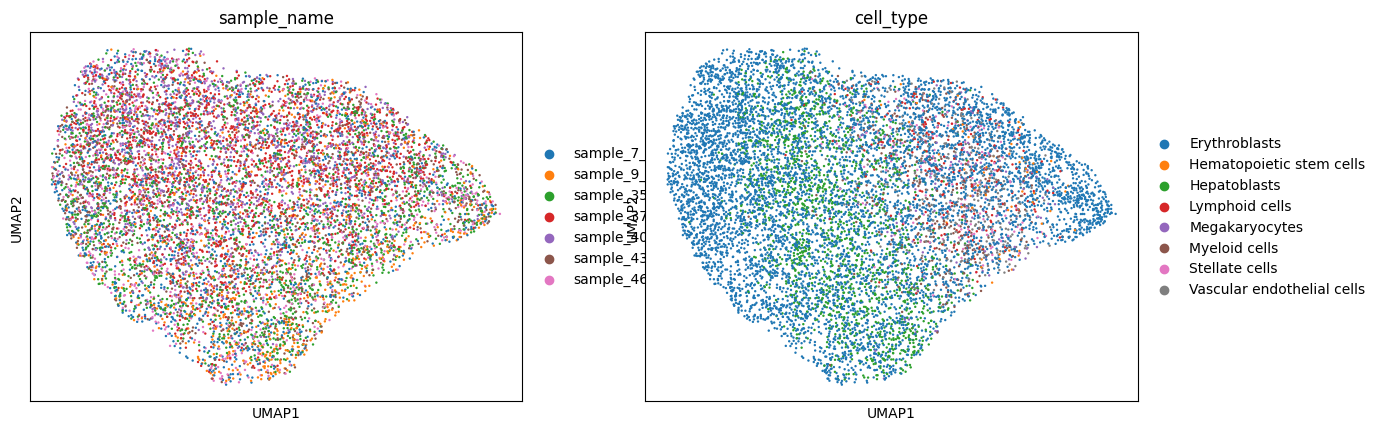
Latent representations from DeepDive can be computed using the get_latent method. To compute latent representations of only the residuals, an empty list can be passed to covars_to_add.
[15]:
residual = model.get_latent(adata, covars_to_add = [])
[16]:
sc.pp.neighbors(residual)
sc.tl.umap(residual)
[17]:
sc.pl.umap(residual, color = ['sample_name', 'cell_type'])
Summary#
This notebook covers the complete workflow of:
Preparing a dataset for DeepDive
Defining model and training parameters
Specifying covariates to disentangle
Training and monitoring the model
Saving and reloading models
Performing reconstruction and counterfactual prediction
[ ]: